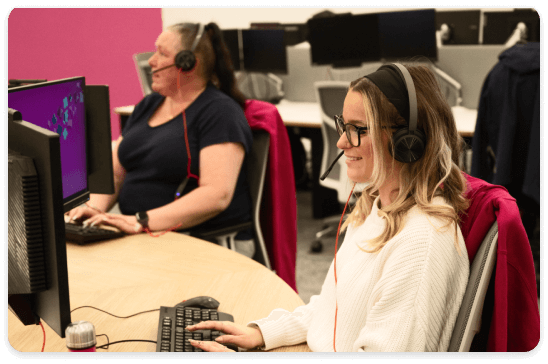
Why we’re moving your service to EE
At Plusnet, we’re keeping things simple with broadband only packages backed up by award-winning customer service.
Our packages will no longer include any home phone services. We understand a home phone is essential for some customers, so to ensure you stay connected, we’re moving your broadband and phone service to EE.
Plusnet and EE are part of the same family, so just think of it as moving home from home. You’ll still be looked after, and get great broadband with a Digital Home Phone service, with even better call quality. Making having a natter with family and friends even easier.
Don’t use your home phone? Stay with Plusnet
If you don’t use your home phone and prefer using your mobile to make calls, there's no need to move!
Just upgrade to a Plusnet broadband only package, which doesn’t include a home phone service. We love having you with us, so if you want to stay, please upgrade your Plusnet package within 30 days from when we notified you of the move to EE.
Our cash-saving deals are waiting for you.
Select a tile to to find out more about your move to EE.

What do I need to know about my move to EE?
We’ll let you know about your Plusnet contract and the benefits of moving to EE
What do I need to know about my move to EE?
EE broadband with Digital Home Phone is packed with flexible calling features included as standard to make staying in touch easier, clearer, and more secure. To use the Digital Home Phone service to make and receive phone calls all you need to do is plug your phone into your EE broadband hub. It’s just like your home phone, but much better and includes these great features.
Crystal clear call quality
Digital Home Phone is powered over EE broadband, so you can enjoy higher quality calls.
No line rental
No line rental, and you won’t need to choose a call pack, you'll be automatically set-up with EE's Unlimited Minutes or Unlimited Minutes and International calls if you already have a Plusnet International call plan.
Voicemail included
Call pack features include Caller Display, Voicemail, Call Waiting, 3-Way Calling and Call Barring.
Call Protect
Stop unwanted calls and send them to your junk voicemail.
Make and receive two calls at once
Make two calls on the same line at the same time. And with 3-Way Calling you can chat with two other people at the same time too.
Learn more about EE Digital Home Phone.
Moving to EE provides lots of other great benefits.
You’ll get exclusive EE existing customer offers on SIM-only plans, handsets and TV. Find out about all the EE perks.
Like Plusnet, EE also has world class UK-based Guides who are always on hand to provide all the help and advice you need.
Will I pay the same for my broadband with EE?
Yes. We’ll move you to an EE broadband package that cost the same, or in some cases a little less each month. Depending on whether you’ve a Plusnet international calling plan, you’ll be set up with either EE’s Unlimited Minutes or Unlimited Minutes and International pack. You won’t need to choose one yourself. And out of bundle call charges may vary.
Will I start a new contract when you move me to EE?
No. Your contract status and term won’t change when your account is moved over to EE. If you’re out of contact with Plusnet, you’ll remain out of contract with EE. Or if you’re mid-contract you’ll still have the same amount of time left on your contract when your account is moved to EE.
Will my broadband speed change?
No. You'll have the same speed or faster than you have today.
Will I need new home phone?
No. You can use your current home phone by just plugging it in to your new EE hub once your service has been switched over to EE. You’ll be sent all the information you need on how to do this.
Will my telephone number stay the same?
Yes. We’ll move your telephone number over to your new EE account, so you can keep using the same one.
Will I need new broadband hub?
Yes. We’ll send you a brand-new EE hub for free which you can set up after your move to EE has completed. Your current Plusnet hub won’t work with EE broadband, and it isn’t compatible with Digital Home Phone.
What information will you move from my Plusnet account to the new EE account?
We’ll move across:
- your personal details - your name, address and home phone number, so that you can keep the same number
- the ways we contact you - your email address, mobile number, if you’ve given us one
- your billing details to set up your new Direct Debit with EE
- your marketing preferences will stay the same as you’ve set them in your Plusnet account. You can update them any time until the day before your move to EE. Just log in to update your preferences
We’ll use your current Plusnet products and service details to match you to the same or better EE plan.
Absolutely. If you don’t use your home phone, we can help you upgrade to a Plusnet broadband only package. Using the latest technology there’s no home phone needed to set up your connection.
You’ll get our fastest, most reliable speeds, and you won’t need to pay for a phone service you don’t need.
All with award-winning, UK-based customer support here for you every day.
We love having you with us, so if you want to stay, please upgrade your Plusnet package within 30 days from when we notified you of the move to EE.

When will my service move to EE?
All your questions answered about what happens before and after your switch
When will my service move to EE?
Your move will usually begin around 30 days after we’ve been in touch by letter and email.
EE will email you to confirm when your services will switch. If an engineer visit is needed, Openreach will contact you directly to arrange an appointment to install your new services.


Switchover day
You're an EE customer
We’ll let you know when we’ve completed the switchover.
What happens now?
Once we’ve told you that the switchover is complete, you can set up your new EE Broadband hub - it’s easy to do. Then just plug your home phone into your hub so you can make and receive calls as usual.

We’ll let you know if an engineer needs to visit. Check your letter from us – it will confirm whether you need an appointment to install your new service.
If you’re moving to EE Full Fibre:
Openreach will contact you by email or text to arrange a convenient appointment. Once you’ve confirmed the date, an engineer will visit your home to install your service.
If you’re moving to EE Fibre:
In most cases, there’s no need for an engineer visit. Your broadband and home phone service can be moved to EE without the need for an engineer to visit your home.
If additional support is needed:
If your home requires extra equipment or you have additional needs for support with setup, we’ll let you know in your letter. Openreach will then contact you to arrange an engineer to carry out the work at your property.
You’ll get a call from the engineer telling you when to expect them. Let them know if there are any access restrictions when they call.
Someone will need to let the engineer know where to install your connection. The engineer will then get to work.
I’m moving to Full Fibre - how is this installed?
You’ll agree on how to get the connection into the home with the engineer. Installation can take up to 3 hours and includes work both inside and outside your home.
To bring the Full Fibre cable into your home, the engineer will drill a small hole from the outside.
The engineer will install a junction box on the outside wall and run a Full Fibre cable from either a nearby telephone pole or underground cables.
After feeding the cable through the wall, the engineer will install an Openreach modem inside your home. This is where your Smart Hub will connect.
Please note: If your cable comes from a telephone pole, the engineer may need to drill two extra holes to safely secure their ladder.
On switchover day, we’ll let you know by email and a text message when your account has moved over to EE. Once the switch is complete, you’ll notice that your Plusnet hub is no longer connected to the internet.
Now your new EE broadband service is live follow the set-up guide to connect your EE broadband hub. Once your connected follow the three steps to set your Digital Home Phone service:
- Unplug your home phone from the master socket on your wall, or it may be plugged to a microfilter. Don’t unplug the microfilter, just the home phone
- Plug the home phone cable directly into the green phone port on the back of the EE broadband hub
- Try your home phone to make sure you can hear a dial tone. Here’s a handy video that shows you how to set up your Digital Home Phone service
Once your EE broadband hub is set up and ready to go, you’ll need to reconnect the smart devices in your home to the WiFi name and password of the EE hub.
Don’t worry! If your home phone is in a different room to your broadband hub or its cable doesn’t reach your broadband hub, you can use a Digital Home Phone Adapter to place it wherever you want in your home. You can find out more about Digital Home Phone Adapters.
You can order a free Digital Home Phone Adapter. We’ll let you know how to order one when we let you know your move date.
Yes. The name of your call plan will change when your account moves to EE. We’ll make sure that you’re matched to a call plan that gives you the same benefits as, or better than your Plusnet call plan.
Will I have to set up my call features again when I move to EE?
Yes. Unfortunately, it’s not possible to move your calling feature settings from Plusnet over to EE.
Will I lose my voice mail messages when I move to EE?
Yes. Any voicemail messages that are linked to your Plusnet home phone service will no longer be available you’re your account moves to EE. If your voicemail messages are stored in the memory of your home phone handset these will be unaffected by the move.
I’m ex-directory. Will I still be ex-directory when I’m moved to EE?
Absolutely. If your telephone number is registered as ex-directory with Plusnet, it will remain ex-directory with EE.
We'd really appreciate it if you send your equipment back to us so we can refurbish and recycle it. It helps reduce clutter for you and helps us do our bit for the planet by keeping Plusnet more environmentally friendly. After your move to EE is complete here's what you need to do:
- pop our router, power supply, plus any cables and microfilters you might have in a bag or box
- print a free returns label at Track my return | Royal Mail Group Ltd
- drop it at your local Post Office, post box or arrange a collection at the Royal Mail website
After your account has moved over to EE, you’ll no longer use Plusnet Member Centre to manage your broadband and Digital Home Phone service.
To access EE help and support you can either:
- call EE 150 from your EE mobile phone or 0330 123 1105 from any other phone and speak to a friendly UK based EE Guide
- log into your EE account to view your bills, check what’s include in your plan, buy add-ons, view rewards and so on
Until your move to EE is complete, please continue to contact Plusnet as normal. Call Plusnet customer service on 0330 123 9123

What happens to my current service and add-ons?
Find out about your bills, Direct Debit and what to do if you need extra support
What happens with my bills?
Will my bill and payment date say the same?
We’ll do our best to keep your bill and payment dates the same. If we need to amend these dates, we’ll never make them earlier in the month than they are today with Plusnet, but they could be up to five days later.
Once you’ve had your first bill from EE, you’ll be able to change your billing and payment dates either online at EE.co.uk or by giving EE a call.
Who will I pay my bills to after I’ve moved?
After your account moves, you’ll get bills directly from EE. Any payments will appear on your bank or card statement will show as EE Ltd, not Plusnet.
Why do you need to set up a Direct Debit with EE?
After the switchover, EE will be your new broadband and Digital Home Phone provider, so they’ll handle your billing going forward.
But don’t worry, we’ll use the same bank details you already have with Plusnet to set your Direct Debit automatically to pay your EE bills.
Do I need to cancel my Plusnet Direct Debit?
No, not yet. Please leave your Plusnet Direct Debit open for now as we’ll need to take your final Plusnet bill payment, which can be three to four weeks after your move to EE is complete.
When will I receive my first EE bill?
You’ll receive your first EE bill the day after your account is moved over to EE. This covers the days from your switchover. Your next bill will be 30 days later and thereafter.
When will I receive my final Plusnet bill?
You’ll receive this around three to four weeks after your move to EE is complete.
Can I still access my old Plusnet bills after I’ve moved to EE?
Yes. After your service has moved, your Plusnet bills will be available for 12 months. Just log in to Member Centre.
After you’ve moved over to EE, you’ll need to use EE.co.uk or the EE app to manage your broadband and phone account.
We’re here to help you and make the move to EE as easy as possible. Give our friendly Plusnet team a call on 0330 1239 123 to chat through the support you need.
Call our team a call on 0330 1239 123 and we’ll advise what you need to do.
It’s also important to get in touch with your medical pendant or telecare alarm provider to check if your devices are compatible with a Digital Home Phone service.
We have a security alarm system that connects to our phone line, what do we need to do?
Give our team a call to discuss your options. You’ll also need to get in touch with the provider of your alarm to check if your system will work with Digital Home Phone.
Yes. If your email Plusnet email account has moved to our new supplier, Greenby, you’ll still have access to your Plusnet email.
What will happen to my Referral Credits?
If your broadband and home phone are being moved to EE, we’ll honour up to three referral discounts per customer. This will be built into your new EE price and so will no longer show as a monthly discount.
What happens if I move to EE and my referred friend leaves Plusnet?
If we move your broadband and home phone to EE with a discounted price and the person you referred then leaves Plusnet, you’ll continue to be charged the same discounted price. There will no longer be an association with the referred Plusnet customer and your account.
When will the discounted price end?
Your discounted price will only change if you come to the end of your discounted contract period, or you change your package. If you change your package, then you’ll be subject to the terms and conditions as set out when you agree your new plan.
What if the person I referred moves to EE?
If the person you referred moves to EE before we switch you to EE, then you’ll lose the discount linked to that referral before you switch over and this won’t be re-applied.
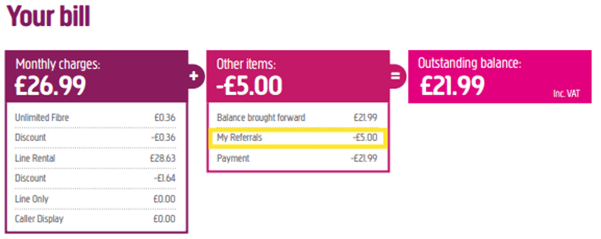
How will my discount show on a bill?With Plusnet you’ll currently see a split bill line for ‘My Referrals’, however on EE this won’t be split out on your bill, your previous referral discount will be reflected in the total bill price you pay.
What will happen to Plusnet Protect when I switch to EE?
When your broadband and home phone move over to EE you’ll need to replace Plusnet Protect powered by Norton, with EE Cyber Security which is also powered by Norton.
Plusnet Protect will stop working when your current subscription with Norton ends, however you’ll have access to EE Cyber Security as soon as your switch to EE completes.
Before you install EE Cyber Security, you’ll need to uninstall Plusnet Protect from your devices. For help with installation head to the Setting Up EE Cyber Security guide.
EE Cyber Security includes more features and benefits than Plusnet Protect.


There are also differences between the parental controls available on the Plusnet Hub router versus the EE Smart Hub.


If you’ve got a Static IP address provided by Plusnet, this will no longer be available once your broadband and home phone are moved to EE. There is no equivalent service available for this on EE.
If you still need a Static IP and IP Voice and you’re a business, then this is a service that BT Business can provide.
What do I need to know about my move to EE?
EE broadband with Digital Home Phone is packed with flexible calling features included as standard to make staying in touch easier, clearer, and more secure. To use the Digital Home Phone service to make and receive phone calls all you need to do is plug your phone into your EE broadband hub. It’s just like your home phone, but much better and includes these great features.
Crystal clear call quality
Digital Home Phone is powered over EE broadband, so you can enjoy higher quality calls.
No line rental
No line rental, and you won’t need to choose a call pack, you'll be automatically set-up with EE's Unlimited Minutes or Unlimited Minutes and International calls if you already have a Plusnet International call plan.
Voicemail included
Call pack features include Caller Display, Voicemail, Call Waiting, 3-Way Calling and Call Barring.
Call Protect
Stop unwanted calls and send them to your junk voicemail.
Make and receive two calls at once
Make two calls on the same line at the same time. And with 3-Way Calling you can chat with two other people at the same time too.
Learn more about EE Digital Home Phone.
Moving to EE provides lots of other great benefits.
You’ll get exclusive EE existing customer offers on SIM-only plans, handsets and TV. Find out about all the EE perks.
Like Plusnet, EE also has world class UK-based Guides who are always on hand to provide all the help and advice you need.
Will I pay the same for my broadband with EE?
Yes. We’ll move you to an EE broadband package that cost the same, or in some cases a little less each month. Depending on whether you’ve a Plusnet international calling plan, you’ll be set up with either EE’s Unlimited Minutes or Unlimited Minutes and International pack. You won’t need to choose one yourself. And out of bundle call charges may vary.
Will I start a new contract when you move me to EE?
No. Your contract status and term won’t change when your account is moved over to EE. If you’re out of contact with Plusnet, you’ll remain out of contract with EE. Or if you’re mid-contract you’ll still have the same amount of time left on your contract when your account is moved to EE.
Will my broadband speed change?
No. You'll have the same speed or faster than you have today.
Will I need new home phone?
No. You can use your current home phone by just plugging it in to your new EE hub once your service has been switched over to EE. You’ll be sent all the information you need on how to do this.
Will my telephone number stay the same?
Yes. We’ll move your telephone number over to your new EE account, so you can keep using the same one.
Will I need new broadband hub?
Yes. We’ll send you a brand-new EE hub for free which you can set up after your move to EE has completed. Your current Plusnet hub won’t work with EE broadband, and it isn’t compatible with Digital Home Phone.
What information will you move from my Plusnet account to the new EE account?
We’ll move across:
- your personal details - your name, address and home phone number, so that you can keep the same number
- the ways we contact you - your email address, mobile number, if you’ve given us one
- your billing details to set up your new Direct Debit with EE
- your marketing preferences will stay the same as you’ve set them in your Plusnet account. You can update them any time until the day before your move to EE. Just log in to update your preferences
We’ll use your current Plusnet products and service details to match you to the same or better EE plan.
Absolutely. If you don’t use your home phone, we can help you upgrade to a Plusnet broadband only package. Using the latest technology there’s no home phone needed to set up your connection.
You’ll get our fastest, most reliable speeds, and you won’t need to pay for a phone service you don’t need.
All with award-winning, UK-based customer support here for you every day.
We love having you with us, so if you want to stay, please upgrade your Plusnet package within 30 days from when we notified you of the move to EE.
When will my service move to EE?
Your move will usually begin around 30 days after we’ve been in touch by letter and email.
EE will email you to confirm when your services will switch. If an engineer visit is needed, Openreach will contact you directly to arrange an appointment to install your new services.
Switchover day
You're an EE customer
We’ll let you know when we’ve completed the switchover.
What happens now?
Once we’ve told you that the switchover is complete, you can set up your new EE Broadband hub - it’s easy to do. Then just plug your home phone into your hub so you can make and receive calls as usual.
We’ll let you know if an engineer needs to visit. Check your letter from us – it will confirm whether you need an appointment to install your new service.
If you’re moving to EE Full Fibre:
Openreach will contact you by email or text to arrange a convenient appointment. Once you’ve confirmed the date, an engineer will visit your home to install your service.
If you’re moving to EE Fibre:
In most cases, there’s no need for an engineer visit. Your broadband and home phone service can be moved to EE without the need for an engineer to visit your home.
If additional support is needed:
If your home requires extra equipment or you have additional needs for support with setup, we’ll let you know in your letter. Openreach will then contact you to arrange an engineer to carry out the work at your property.
You’ll get a call from the engineer telling you when to expect them. Let them know if there are any access restrictions when they call.
Someone will need to let the engineer know where to install your connection. The engineer will then get to work.
I’m moving to Full Fibre - how is this installed?
You’ll agree on how to get the connection into the home with the engineer. Installation can take up to 3 hours and includes work both inside and outside your home.
To bring the Full Fibre cable into your home, the engineer will drill a small hole from the outside.
The engineer will install a junction box on the outside wall and run a Full Fibre cable from either a nearby telephone pole or underground cables.
After feeding the cable through the wall, the engineer will install an Openreach modem inside your home. This is where your Smart Hub will connect.
Please note: If your cable comes from a telephone pole, the engineer may need to drill two extra holes to safely secure their ladder.
On switchover day, we’ll let you know by email and a text message when your account has moved over to EE. Once the switch is complete, you’ll notice that your Plusnet hub is no longer connected to the internet.
Now your new EE broadband service is live follow the set-up guide to connect your EE broadband hub. Once your connected follow the three steps to set your Digital Home Phone service:
- Unplug your home phone from the master socket on your wall, or it may be plugged to a microfilter. Don’t unplug the microfilter, just the home phone
- Plug the home phone cable directly into the green phone port on the back of the EE broadband hub
- Try your home phone to make sure you can hear a dial tone. Here’s a handy video that shows you how to set up your Digital Home Phone service
Once your EE broadband hub is set up and ready to go, you’ll need to reconnect the smart devices in your home to the WiFi name and password of the EE hub.
Don’t worry! If your home phone is in a different room to your broadband hub or its cable doesn’t reach your broadband hub, you can use a Digital Home Phone Adapter to place it wherever you want in your home. You can find out more about Digital Home Phone Adapters.
You can order a free Digital Home Phone Adapter. We’ll let you know how to order one when we let you know your move date.
Yes. The name of your call plan will change when your account moves to EE. We’ll make sure that you’re matched to a call plan that gives you the same benefits as, or better than your Plusnet call plan.
Will I have to set up my call features again when I move to EE?
Yes. Unfortunately, it’s not possible to move your calling feature settings from Plusnet over to EE.
Will I lose my voice mail messages when I move to EE?
Yes. Any voicemail messages that are linked to your Plusnet home phone service will no longer be available you’re your account moves to EE. If your voicemail messages are stored in the memory of your home phone handset these will be unaffected by the move.
I’m ex-directory. Will I still be ex-directory when I’m moved to EE?
Absolutely. If your telephone number is registered as ex-directory with Plusnet, it will remain ex-directory with EE.
We'd really appreciate it if you send your equipment back to us so we can refurbish and recycle it. It helps reduce clutter for you and helps us do our bit for the planet by keeping Plusnet more environmentally friendly. After your move to EE is complete here's what you need to do:
- pop our router, power supply, plus any cables and microfilters you might have in a bag or box
- print a free returns label at Track my return | Royal Mail Group Ltd
- drop it at your local Post Office, post box or arrange a collection at the Royal Mail website
After your account has moved over to EE, you’ll no longer use Plusnet Member Centre to manage your broadband and Digital Home Phone service.
To access EE help and support you can either:
- call EE 150 from your EE mobile phone or 0330 123 1105 from any other phone and speak to a friendly UK based EE Guide
- log into your EE account to view your bills, check what’s include in your plan, buy add-ons, view rewards and so on
Until your move to EE is complete, please continue to contact Plusnet as normal. Call Plusnet customer service on 0330 123 9123
What happens with my bills?
Will my bill and payment date say the same?
We’ll do our best to keep your bill and payment dates the same. If we need to amend these dates, we’ll never make them earlier in the month than they are today with Plusnet, but they could be up to five days later.
Once you’ve had your first bill from EE, you’ll be able to change your billing and payment dates either online at EE.co.uk or by giving EE a call.
Who will I pay my bills to after I’ve moved?
After your account moves, you’ll get bills directly from EE. Any payments will appear on your bank or card statement will show as EE Ltd, not Plusnet.
Why do you need to set up a Direct Debit with EE?
After the switchover, EE will be your new broadband and Digital Home Phone provider, so they’ll handle your billing going forward.
But don’t worry, we’ll use the same bank details you already have with Plusnet to set your Direct Debit automatically to pay your EE bills.
Do I need to cancel my Plusnet Direct Debit?
No, not yet. Please leave your Plusnet Direct Debit open for now as we’ll need to take your final Plusnet bill payment, which can be three to four weeks after your move to EE is complete.
When will I receive my first EE bill?
You’ll receive your first EE bill the day after your account is moved over to EE. This covers the days from your switchover. Your next bill will be 30 days later and thereafter.
When will I receive my final Plusnet bill?
You’ll receive this around three to four weeks after your move to EE is complete.
Can I still access my old Plusnet bills after I’ve moved to EE?
Yes. After your service has moved, your Plusnet bills will be available for 12 months. Just log in to Member Centre.
After you’ve moved over to EE, you’ll need to use EE.co.uk or the EE app to manage your broadband and phone account.
We’re here to help you and make the move to EE as easy as possible. Give our friendly Plusnet team a call on 0330 1239 123 to chat through the support you need.
Call our team a call on 0330 1239 123 and we’ll advise what you need to do.
It’s also important to get in touch with your medical pendant or telecare alarm provider to check if your devices are compatible with a Digital Home Phone service.
We have a security alarm system that connects to our phone line, what do we need to do?
Give our team a call to discuss your options. You’ll also need to get in touch with the provider of your alarm to check if your system will work with Digital Home Phone.
Yes. If your email Plusnet email account has moved to our new supplier, Greenby, you’ll still have access to your Plusnet email.
What will happen to my Referral Credits?
If your broadband and home phone are being moved to EE, we’ll honour up to three referral discounts per customer. This will be built into your new EE price and so will no longer show as a monthly discount.
What happens if I move to EE and my referred friend leaves Plusnet?
If we move your broadband and home phone to EE with a discounted price and the person you referred then leaves Plusnet, you’ll continue to be charged the same discounted price. There will no longer be an association with the referred Plusnet customer and your account.
When will the discounted price end?
Your discounted price will only change if you come to the end of your discounted contract period, or you change your package. If you change your package, then you’ll be subject to the terms and conditions as set out when you agree your new plan.
What if the person I referred moves to EE?
If the person you referred moves to EE before we switch you to EE, then you’ll lose the discount linked to that referral before you switch over and this won’t be re-applied.
How will my discount show on a bill?With Plusnet you’ll currently see a split bill line for ‘My Referrals’, however on EE this won’t be split out on your bill, your previous referral discount will be reflected in the total bill price you pay.
What will happen to Plusnet Protect when I switch to EE?
When your broadband and home phone move over to EE you’ll need to replace Plusnet Protect powered by Norton, with EE Cyber Security which is also powered by Norton.
Plusnet Protect will stop working when your current subscription with Norton ends, however you’ll have access to EE Cyber Security as soon as your switch to EE completes.
Before you install EE Cyber Security, you’ll need to uninstall Plusnet Protect from your devices. For help with installation head to the Setting Up EE Cyber Security guide.
EE Cyber Security includes more features and benefits than Plusnet Protect.
There are also differences between the parental controls available on the Plusnet Hub router versus the EE Smart Hub.
If you’ve got a Static IP address provided by Plusnet, this will no longer be available once your broadband and home phone are moved to EE. There is no equivalent service available for this on EE.
If you still need a Static IP and IP Voice and you’re a business, then this is a service that BT Business can provide.